
Free online Markdown converter
How to convert
Three steps. No signup, no email, no cloud locker.
- 1
Paste or upload
Drop your Markdown or MDX file into the editor, paste source directly, or click Upload to load a file from disk.
- 2
Choose format and theme
Pick PDF, DOCX (Word), or HTML as the output format. Optionally switch to Academic for a cover page or README/Blog for GitHub-style typography.
- 3
Convert and download
Click Convert & Download. The file streams back as a real binary — no signup, no email, no cloud locker. Your source is never stored.
Why this converter
Built for the docz.me invoicing app — released as a free standalone because the underlying pipeline turned out to be useful on its own.
Server-side rendering, real binaries
Output is a real PDF, real DOCX, or self-contained HTML — not a screenshot or rebadged HTML. Selectable text, embedded fonts, proper page breaks.
GFM and MDX in the same pipeline
Tables, task lists, footnotes, autolinks parse like GitHub. Switch to MDX input for Callout / CodeBlock / Tabs / Steps components — all rendered statically.
Three themes, one source
Default for clean modern docs, Academic with cover page and numbered headings, README/Blog for GitHub typography. Switch and re-render — keep your source.
Privacy first
Stateless serverless function. Source text is never logged or persisted. 500 KB cap enforced before parse so the worst case is a friendly error.
MDX without the JS-execution risk
Parse-only path. JSX expressions, ESM imports, and unknown components are rejected by design. No code from your source ever runs server-side.
No signup, no email gate
Free, anonymous, ungated. Built by docz.me — the invoicing app for freelancers — but the converter stands alone with no account requirement.
Most Markdown converters either pretend to be desktop apps or quietly outsource to Pandoc on a laggy server. This one runs straight in the docz.me marketing app, server-side, and hands you a finished file in under a second on warm starts. The pipeline is unified + remark-parse + remark-gfm, so the GitHub-flavored Markdown features you actually use — task lists, tables, footnote references, autolinks — all parse the way you'd expect.
Three themes ship today: Default for clean modern documents, Academic for thesis-style PDFs with a numbered-heading cover page, and README/Blog for GitHub-flavored typography. Each theme drives all three output formats from the same source markdown — switch the theme dropdown, click convert, get a different file.
Privacy: nothing about your input is logged. The 500 KB cap is enforced before parse so the worst case is a 413 error, not a stalled request. The endpoint sits behind Vercel's standard request timeout (10s on Hobby), with SSRF protection on any image URL you reference. If you want to inspect the source, every line lives at github.com/docz-me — including the test fixtures used to keep the converter honest.
When to pick which output format
PDF is the right pick when the file's audience won't edit it — clients, examiners, finance reviewers, anyone who needs a faithful frozen document. DOCX is the right pick when the audience will edit, comment, or track changes — the deliverable lands inside someone's review workflow. HTML is the right pick for embedding in a CMS, attaching to a release, or shipping a self-contained read-it-anywhere artifact. Same source markdown drives all three; the format choice is about where the file's life goes next.
Edge cases the pipeline gets right
Nested lists carry depth correctly into all three formats — five-deep outlines stay legible. Fenced code blocks render with monospaced fonts and a consistent shaded background. Inline emphasis and inline code spans survive line wrapping without dropped runs. GFM tables are first-class in DOCX and HTML; the PDF path emits a styled fallback note while we wait for @react-pdf table primitives to stabilise. Blockquotes inside list items keep their left-border treatment without doubling the indent. Hyperlinks stay clickable in PDF and DOCX readers.
Themes are pure data — switching from Default to Academic doesn't re-parse your source. Behind the scenes the converter parses once, walks the MDAST tree, and lets each renderer (PDF / DOCX / HTML) pick up the active theme tokens during emit. That's why round-trips are fast on warm starts: the parse half is shared across format and theme combinations, and the bottleneck is always the renderer-specific pass.
How it compares
Markdown Converter stacked against the alternatives most folks reach for. Honest framing — Pandoc and the platform tools are powerful in ways we're not.
| Feature | docz.me | Pandoc | Browser print | GitHub render | Word import .md |
|---|---|---|---|---|---|
| Output formats | PDF + DOCX + HTML | Many | PDF only | HTML only | DOCX only |
| Themes | 3 — across all formats | Via custom templates | Site CSS | GitHub style fixed | Word template |
| Setup | None | Install + LaTeX for PDFs | Render markdown first | Push to a repo | Word license |
| Privacy | Stateless, source not logged | 100% local | 100% local | Public if public repo | 100% local |
| MDX support | Allowlisted, static render | No | No | No | No |
Example source
Copy and run through the converter to see the output match the described behavior — every example below is a real fixture.
# Release 1.2.0

## What's new

- [x] Markdown converter ships
- [x] Three themes
- [ ] Custom fonts (v1.1)

| Format | Status |
| --- | --- |
| PDF | Stable |
| DOCX | Stable |
| HTML | Stable |

```bash
curl -X POST https://docz.me/api/convert \
  -F source=@README.md -F format=pdf
```Honest comparison vs Pandoc
Pandoc is the reference implementation for document conversion. It is genuinely better than us at several things, and we are better at a few. Pick by what you actually need —Pandoc lives here ↗.
Where docz.me wins
- Zero install — paste markdown, pick a format, download. No Homebrew, no LaTeX distribution, no template authoring required.
- One source, three opinionated outputs. Same theme tokens drive PDF + DOCX + HTML so the trio looks like siblings.
- Anonymous and stateless — no source logging, no signup, no email gate. The 500 KB cap is the only constraint.
Where Pandoc wins
- Pandoc handles dozens of input and output formats (LaTeX, RST, EPUB, slide decks, man pages) we don't approach.
- Pandoc runs offline and integrates into shell pipelines and CI. Our tool is online-only and one-shot.
- Pandoc's template mechanisms (LaTeX templates, reference.docx, custom CSS) give pixel-precise output control we don't match — three opinionated themes beat "none," but they don't match arbitrary corporate brand books.
Theme showcase
Three opinionated themes drive every output format from the same source. Pick the one that matches the deliverable's audience.
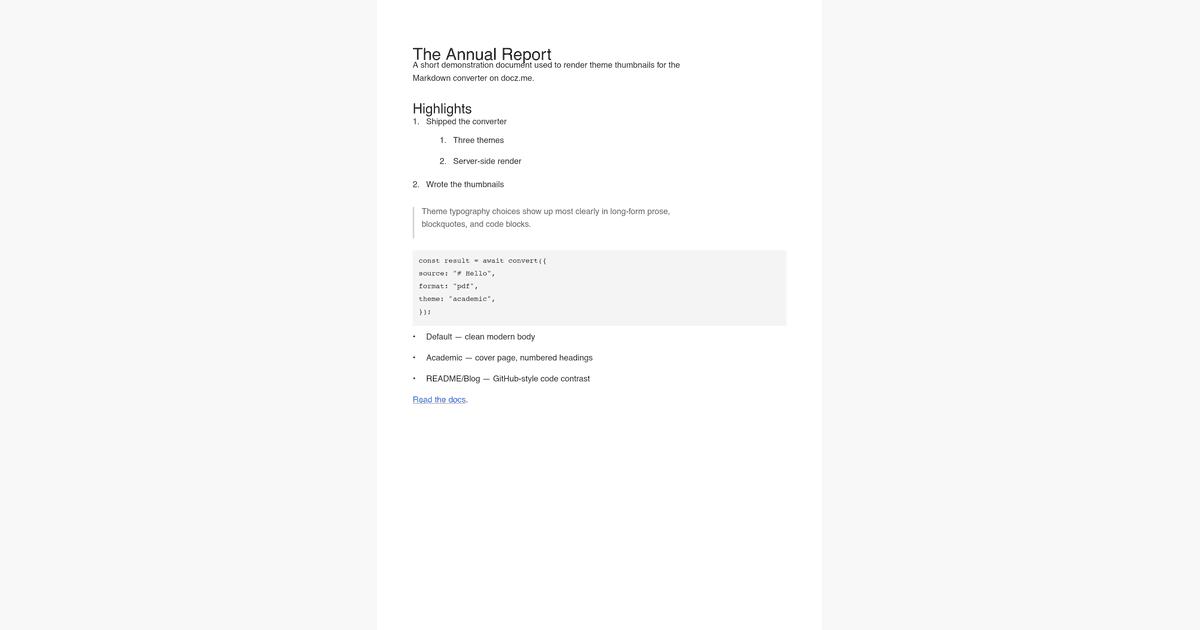
default
Clean modern body and headings, neutral palette, light shading on code blocks. The right pick when the deliverable's job is to look polished without taking a stylistic stance.
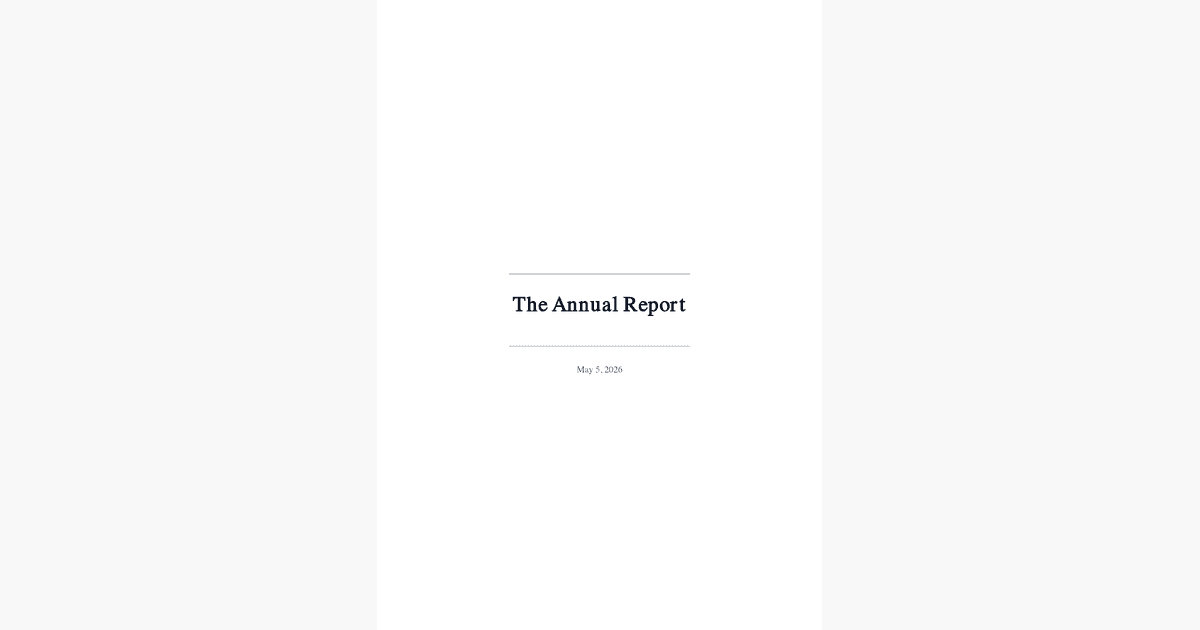
academic
Cover page with title and date, serif body, numbered h1–h3 throughout. Pairs well with thesis chapters, white papers, and reports headed for printed binding or formal review.
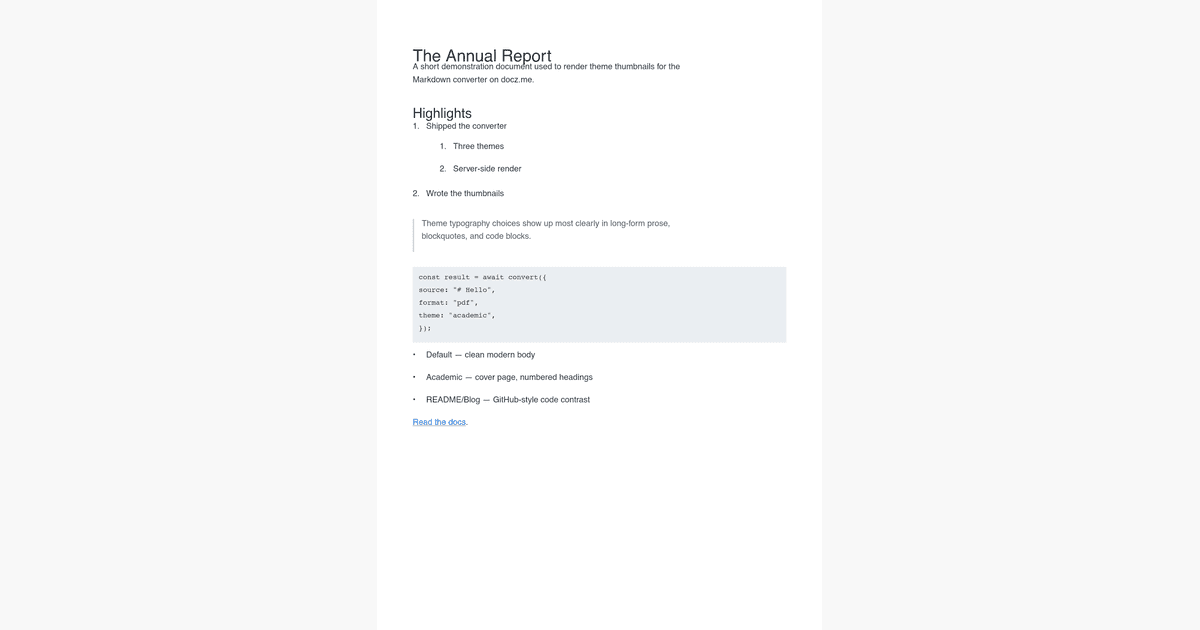
readme / blog
GitHub-flavored typography across all three formats: high-contrast code blocks, dotted underlines on links, tighter paragraph spacing. The right pick for technical write-ups and portfolio exports.
Frequently asked
Is there a file-size limit?
Yes — 500 KB of Markdown source. That's roughly 80,000 words, which is more than most theses. If you hit the cap, split the document into chapters and convert each separately.
Which Markdown flavor is supported?
GitHub-flavored Markdown (GFM): tables, task lists, autolinks, strikethrough, and footnote references. The parser is the same `remark-gfm` plugin used by GitHub itself.
Do you store my Markdown?
No. The conversion runs in a stateless serverless function and the output streams back as a binary download. Source text is never logged or persisted.
Can I convert MDX too?
Yes — switch the input dropdown to MDX. Allowlisted components (Callout, Note, Warning, CodeBlock, Tabs, Steps, Image) render across all three formats. JSX expressions are rejected by design for safety.
Why are themes limited to three?
Themes are pure data, but every theme needs visual review across PDF, DOCX, and HTML. Three is what we can keep honest in v1. More land when we have specific requests; the registry is one file.
Is this Markdown converter free?
Yes. No signup, no email, no upload cap below the 500 KB source limit. We monetise via the docz.me invoicing application, not this tool.
Can I convert markdown without uploading my file?
Yes — paste source directly into the editor. The Upload button is a convenience for loading from disk; either path sends the raw text to a stateless server-side endpoint that doesn't log content.
What's the best free markdown converter online?
Depends on the constraint. This converter wins on multi-format output (PDF + DOCX + HTML from one source), zero-install, three themes, and explicit privacy posture. For offline batch work, Pandoc's CLI remains the most powerful option.
Can I convert markdown to multiple formats at once?
Each conversion produces one format. Run the same source three times and you get a synchronised PDF + DOCX + HTML set — useful when shipping a release announcement that needs all three artifacts.
Does the converter work on mobile?
Yes — the editor is responsive and the conversion endpoint is the same. Mobile use is more common for one-shot conversions of short documents; longer thesis-scale conversions benefit from a desktop browser.
More converters
- MDX Converter— MDX without the JS-execution risk
- Markdown to PDF— Markdown → PDF
- Markdown to DOCX— Markdown → Word (.docx)
- Markdown to HTML— Markdown → HTML
- MDX to PDF— MDX → PDF
- MDX to DOCX— MDX → Word (.docx)
- MDX to HTML— MDX → HTML
Came here looking for DoczJS? See our DoczJS alternatives page →